Showing posts with label Micro Processor. Show all posts
Showing posts with label Micro Processor. Show all posts
Thursday, July 16, 2015


Thursday, November 01, 2012
PIC Animated Tutorials
Please click the Below link to get a collection of useful animations for the Peripheral Interface Controller (PIC)
Animation
Harvard vs Von Nuemann Architecture
Please click the below link to view a useful animation of the different architectures of Microprocessors/ DSP processors.
Animation
Wednesday, August 08, 2012
An Introduction to Micro Processors
Here is a fantastic animation for the fundamentals of Micro processor.

What are the main components of the Micro Processor?
How a Micro Processor works?
Please click on ANIMATION 1 to view the introduction on Micro Processor.
Please click on ANIMATION 2 to view the detailed animation on working of the Micro Processor
What are the main components of the Micro Processor?
How a Micro Processor works?
Please click on ANIMATION 1 to view the introduction on Micro Processor.
Please click on ANIMATION 2 to view the detailed animation on working of the Micro Processor
Memory Hirerarchy in Embedded Systems
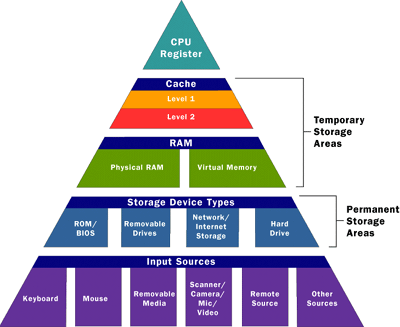 |
| Memory Hierarchy |
The cache memory is defined as the first level of memory after the Registers. In the memory hierarchy, it is placed right below the processor registers as shown in the figure above.
 |
| Speed Vs Distance Vs Size of the Memory |
 |
| How the Processor check for the data? |
The cache is generally made up of SRAM because of the high speed of operation of SRAMs and the faster a cache operates, faster data can be made available to the processor for processing.
 |
| Components in the Memory Hierarchy |
The cache stores in it the data of memory locations that the processor uses repeatably or is expected to use very soon in future. When the processor wants to access data of a certain memory location, the data might be present in cache or not, this is defined by the terms cache hit and cache miss respectively.
Cache Miss
 |
| Cache Miss |
When the processor does not find, the memory location which it wants to access, stored in the cache it has to fetch the data from the main memory. As the data is missing in the cache this is termed as a cache miss.
Cache Hit
 |
| Cache Hit |
Temporal Locality
 |
| Temporal Locality |
Spatial Locality
 |
| Spatial Locality |
The memory locations around the memory that the processor accesses might also be accessed by the processor soon and hence need to stored close the processor in the cache.This is also based on an assumption and we believe that the data next to the current location will be required for the next computation.
I think this below 3 Dimensional Diagram will make the Memory Hierarchy much more clear to the readers.
 |
| How the CPU Access the Memory |
- The address of the needed data is formed in the processor execution or instruction-fetch unit. Most addresses are then mapped from virtual to real through the Translation Look aside Buffer (TLB). Certain ranges of addresses are not mapped, and bypass the TLB.
- Most addresses are presented to the primary cache, a cache in the processor chip. If a copy of the data with that address is found, it is returned immediately. Certain address ranges are never cached; these addresses pass directly to the bus.
- When the primary cache does not contain the data, the address is presented to the secondary cache. If it contains a copy of the data, the data is returned immediately. The size and the architecture of the secondary cache differ from one CPU model to another.
- The address is placed on the system bus. The memory module that recognizes the address places the data on the bus.
(Courtesy: www.mbeded.blogspot.in, www.techpubs.sgi.com)
Instruction Fetch in a Microprocessor
 |
| Instruction Fetch |
The above graphic animation illustrates typical operation of an instruction by the processor.
It places the contents of the instruction pointer onto the address bus and fetches the instruction.
Once decoded, the instruction is executed and the instruction pointer altered to point to the next instruction.
Tuesday, August 07, 2012
Processor Animation
Processor:

Processor or processing unit may contains the following,
CPU
Microprocessor
Graphics processing Unit
Physics Processing Unit
Digital signal processor
Network Processor
Front end processor
Data Processor
Word processor
Audio Processor
Click the below link to view the working animation
Hardwork Can Never Ever Fails..
Best Luck..
Wednesday, July 25, 2012
How the Matrix Keypad works with a Micro controller?
 |
| Fig: Matrix Keypad when there is no Button press |
The matrix is controlled by a micro-controller.
]For the above 16-button 4x4 matrix, 8 pins of the micro controller will be used.
The first 4 pins will be OUTPUTS and will be connected to the COLUMN wires, while the other 4 pins will be INPUTS and will be connected to the ROW wires.
The OUTPUTS of the micro-controller will NOT all have power at the same time.
The outputs will go high one by one in cycle.
During this time, it will also monitor the inputs for a signal. As long as all inputs are LOW , the Micro-controller will take no action.
Now, suppose that the operator presses the button 3C.
Please see the below image.
 |
| Fig: Button 3C of the Matrix Keypad is pressed |
This button has connect the matrix col C, with the matrix row 3.
When the output C of the micro-controller becomes HIGH, the signal arrives also at the input 3 of the micro-controller, through the pressed button.
The micro-controller check the 4 inputs and detects that when the specific output (C) is high, there is a HIGH signal at the input 3.
So, this means that the input C3 is pressed!
Monday, July 02, 2012
Micro Processor

A fantastic collection of Microprocessor basics is available as interactive animations in the following link.
Please Click Here to view the animations.
I am sure that it will be helpful for us to understand, how the data and instruction flow is taking place in the Microprocessor...
Sunday, June 10, 2012
Microcontroller and its application
What is microcontroller?
A highly integrated chip that contains all the components comprising a controller. Typically this includes a CPU, RAM, some form of ROM, I/O ports, and timers. Unlike a general-purpose computer, which also includes all of these components, a microcontroller is designed for a very specific task -- to control a particular system. As a result, the parts can be simplified and reduced, which cuts down on production costs.
Application:BPS
BPS Stands for 'Bata Positioning System'. This system provides real-time information about the current position of each team's current runner in the Batavierenrace.
Last years system used a GSM module, a GPS receiver, a microcontroller and a lot of programming. They were all connected trough a lot of wires and soldering iron. Together with some batteries it was our BPS-box. This box was sending a SMS-message every minute with the latest position of the runner.
How does it works?
Using a GPS device, we will monitor the location of a team. This location data will be parsed by a microcontroller, which then creates an SMS containing all the necessary info (including Date, Time, Speed and course). Using a GSM, which is bundled with the GPS device, this SMS will be sent to a remote server. There, the SMS messages will interpreted, entering the information they carry into a database. With this information, the exact location of each team can be projected onto a map (together with additional info like speed, and estimated time of arrival).
A highly integrated chip that contains all the components comprising a controller. Typically this includes a CPU, RAM, some form of ROM, I/O ports, and timers. Unlike a general-purpose computer, which also includes all of these components, a microcontroller is designed for a very specific task -- to control a particular system. As a result, the parts can be simplified and reduced, which cuts down on production costs.
Application:BPS
BPS Stands for 'Bata Positioning System'. This system provides real-time information about the current position of each team's current runner in the Batavierenrace.
Last years system used a GSM module, a GPS receiver, a microcontroller and a lot of programming. They were all connected trough a lot of wires and soldering iron. Together with some batteries it was our BPS-box. This box was sending a SMS-message every minute with the latest position of the runner.
How does it works?
Using a GPS device, we will monitor the location of a team. This location data will be parsed by a microcontroller, which then creates an SMS containing all the necessary info (including Date, Time, Speed and course). Using a GSM, which is bundled with the GPS device, this SMS will be sent to a remote server. There, the SMS messages will interpreted, entering the information they carry into a database. With this information, the exact location of each team can be projected onto a map (together with additional info like speed, and estimated time of arrival).

Best luck....
Friday, April 20, 2012
What is the difference between Microcontroller and Microprocessor? A commonly asked question!

I will try to improve the list, so that we have a clear idea about the differences.
Subscribe to:
Posts (Atom)